Shift scheduling, working hours and leave in one system
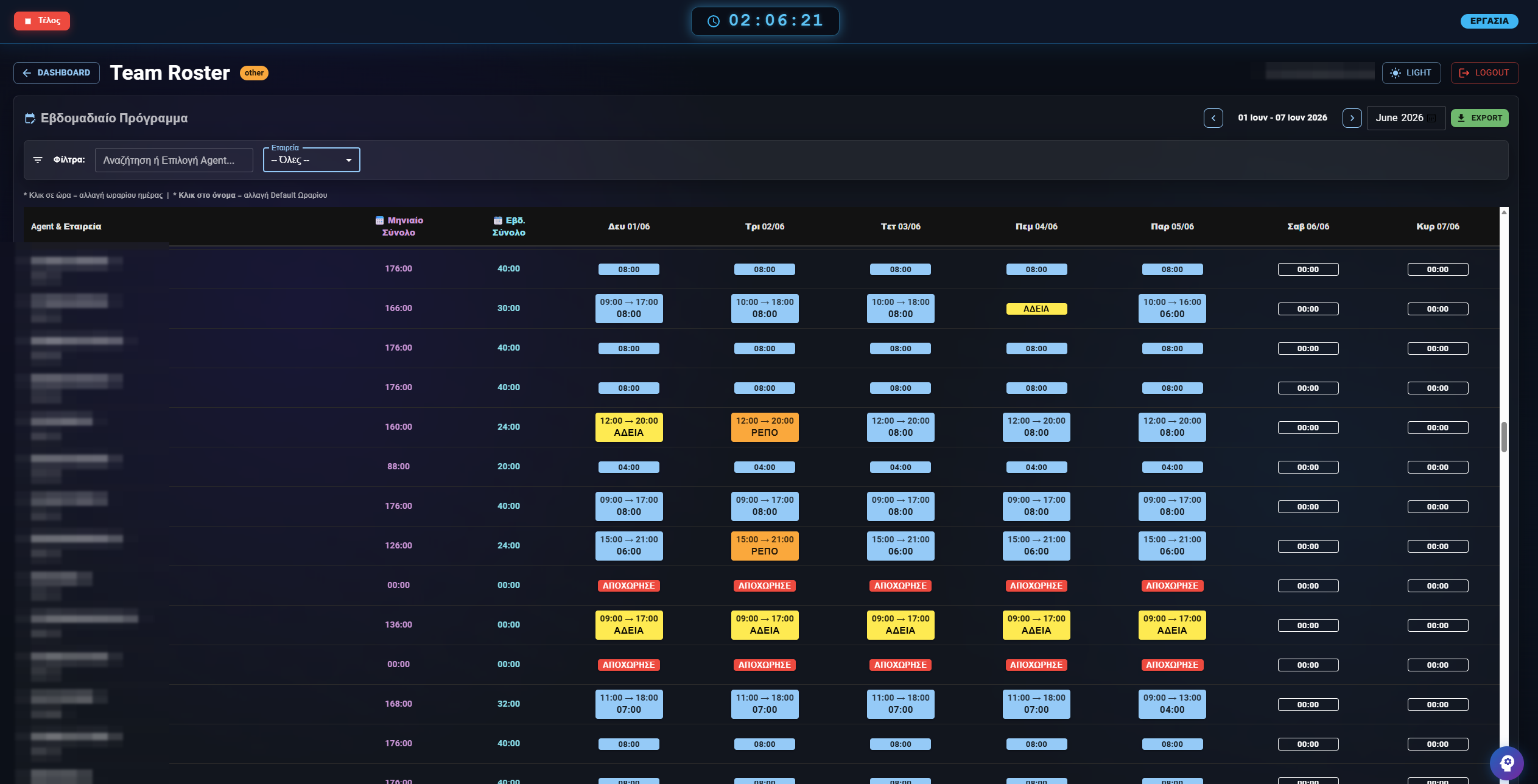
Profferio replaces spreadsheet rosters with one system: you build shift schedules per team, employees clock in with a click, leave is approved inside the platform, and every deviation from the planned schedule surfaces automatically in reports.
- Shift schedules per team, with office or remote marked on each half-shift
- Work clock with breaks — from phone, desktop or tablet
- Leave requests with a manager approval flow
- Planned versus actual hours, with deviations computed automatically
- Excel export in Athens time, ready for payroll
What it includes
Work clock
Start, stop and breaks in one click. A live view of who is on shift right now and from where.
Shift schedules
Build the roster per team or branch, marking office or remote work on each half-shift.
Leave and days off
The employee requests, the manager approves, the balance updates itself. The team calendar shows who is away.
Deviations and overtime
Expected hours are computed from a single source, so the same question always returns the same answer in every report.
Field team on a map
For sales reps, technicians and couriers: live location while on shift, starting and stopping with the work clock.
History and audit trail
Changing a schedule today does not rewrite the past, and the audit trail answers who changed what and when.
From spreadsheets to production
-
1. Teams and hours
Define teams, shifts, holidays and who approves what. Rules come from data, not from exceptions hardcoded somewhere.
-
2. People clock in
Phone, desktop or a tablet at the entrance. Everyone else keeps their habits.
-
3. Leave inside the system
Requests stop arriving by email and enter an approval flow.
-
4. Reports instead of reconciliation
At month end you export attendance, deviations and overtime with one click.
Why spreadsheet rosters cost more than you think
One calculation, three answers
When expected hours are computed in three places — the supervisor's sheet, the management report and payroll — you get three different numbers. In Profferio the calculation lives in one place and every screen uses it.
The past is not rewritten
If you change someone's schedule today, past months must still be judged by the schedule in force back then. Records keep their history, so a change today does not alter reports you have already delivered.
Connected to the digital work card
The same punches that feed attendance are submitted to ERGANI II as the digital work card. You are not maintaining two systems that have to agree.
Shift and attendance FAQ
Can it handle shifts that change every week?
Yes. Schedules are defined per team and week, with different hours per day and an office or remote marker on each half-shift.
How is overtime calculated?
From the difference between actual and expected hours. Expected hours are computed once and shared by every report, so conflicting numbers do not appear.
Does it cover remote work?
Yes. Each half-shift is marked as office or remote, and the distinction carries correctly into ERGANI obligations.
What about staff without a computer?
They clock in on a tablet at the entrance with a personal QR badge and a PIN. No company account or personal phone required.
Can I see who is away today?
Yes. There is a live attendance view and a team calendar with leave, days off and absences.
Does it export for payroll?
Yes, to Excel, with hours in the Athens time zone so no one-hour shifts appear between the system and accounting.
Last updated:
See also
Digital Work Card: time tracking with a direct ERGANI II connection
Ticketing & helpdeskTicketing and helpdesk software built for real workflows
Business Viber AutomationAutomated Viber messages to customers, straight from your tickets
Contact centre (PCC)Contact centre software with a dialer, queues and live reports
Profferio vs JiraThe Greek Jira alternative